What needs you,
in one place.
Adeu Ambient is an app you install on your computer that reads your incoming email and chats, prepares replies and meeting times, and keeps track of what you are working on. You spend less time sorting through messages and stay in control of what gets sent and what it remembers.

How it works
- Sources
Work arrives across your channels
Ambient connects to the accounts and folders you choose.
- Email & calendar
- Microsoft 365, Gmail, Apple Mail, Outlook, Thunderbird, IMAP and Google Calendar.
- Chat & messaging
- Slack, Teams, Discord, WhatsApp and LinkedIn.
- Meetings
- Calendar invites, pre-call context, local or cloud transcription, plus Pocket and Fellow.
- Files & folders
- Local folders, Google Drive, OneDrive, SharePoint and Git.
- On your computer
Ambient keeps memory & prepares the next step
Runs with Google Gemini, a local model or a model you connect.
- Sorts the signal
- Routine messages pass quietly; decisions and things worth knowing surface.
- Drafts & schedules
- Writes replies in your own style and finds meeting times that suit everyone.
- Meeting briefs & notes
- Prepares a brief before each call (agreed, owed, open) and takes notes.
- Local knowledge base
- Updates plain Markdown notes on people, companies, projects and deadlines that stay yours if you switch models.
- In your hands
You decide what gets sent & shared
Your memory, logins and preferences stay on your device.
- Check, change & send
- Review and edit prepared replies, calendar invites and drafts before they go out.
- Learns how you work
- Edit a draft or state a preference once, and Ambient applies it automatically next time.
- Own your notes
- Read or edit your Markdown vault in Obsidian or any editor, or share approved notes to a team Git repo.
- Connect Claude
- Use the work memory Ambient keeps current inside Claude Desktop and Claude Code.
In the app
Your day, on one screen.
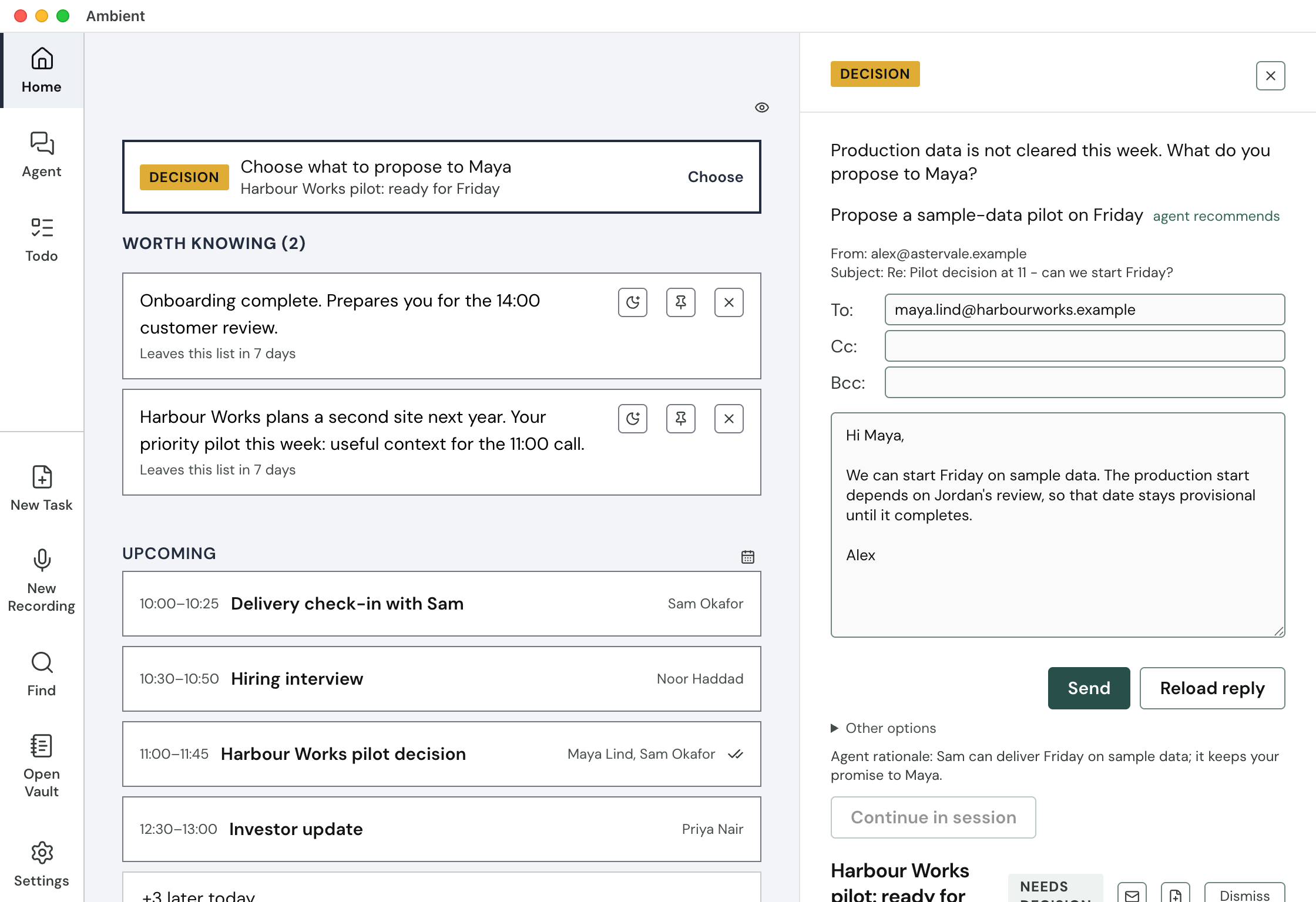
Open Ambient to see what needs a decision, what is worth knowing and what is coming up.
Incoming mail and chat are triaged on Home. When a decision is needed, Ambient drafts a reply in your style that you can edit before sending. Click the Decision card to switch to a suggested meeting time.
In practice
“Ambient is starting to feel like the assistant I have always wished for.”
For contract work
Adeu AI Contract Workflow
Customer contract changes resolved at the salesperson's desk. Adeu checks each draft against your playbook in Claude Desktop and returns a Word redline. Legal is needed only for the exceptions.
Your information
Your notes, preferences and account sign-in tokens stay on your computer, not on our servers. Run a local model on your own machine, or use Google Gemini or a model you connect with optional Sanitization mode to mask names and identifiers before they leave your device.
Runs on Mac, Windows and Linux. Meeting notes work on Mac and Windows.